
ForeFlight vs Garmin Pilot: EFB Apps Compared
.jpg)
In the ForeFlight vs Garmin Pilot debate, the short version is this: ForeFlight has the better flight planning, weather presentation and community of add-ons, but it only runs on iPad and iPhone. Garmin Pilot is cheaper at every level, runs on Android as well as iOS, and is the natural choice if your panel is full of Garmin boxes. Both offer a 30-day free trial, so the cheapest decision is to fly a few weeks with each.
Prices in 2026: $109.99 to $390 a year
Both apps sell annual subscriptions for US pilots. ForeFlight renamed its plans in 2025 without changing prices: Basic Plus became Starter, Pro Plus became Essential, and Performance Plus became Premium.
| Plan | Annual price | Key additions |
|---|---|---|
| ForeFlight Starter | $130 | Planning, filing, VFR/IFR charts, weather, weight and balance, logbook |
| ForeFlight Essential | $260 | Synthetic vision, geo-referenced approach plates, Hazard Advisor, profile views |
| ForeFlight Premium | $390 | Performance profiles, Airport 3D, takeoff and landing numbers, D-ATIS and PDC |
| Garmin Pilot Standard | $109.99 | Charts, weather, planning and filing, logbook |
| Garmin Pilot Premium | $209.99 | Synthetic vision (SVX), terrain and obstacle alerts, SafeTaxi, geo-referenced FliteCharts |
The most direct comparison is ForeFlight Essential against Garmin Pilot Premium, since both include synthetic vision and approach plates drawn on the moving map. That gap is about $50 a year in Garmin’s favor. A Standard owner can also upgrade to Premium for $99.99 later.
ForeFlight: the planning and weather benchmark
ForeFlight has been the default EFB at US flight schools and among Part 91 pilots for years. Its Maps view layers sectionals, IFR charts, radar, satellite, METAR flags, TFRs and PIREPs in a way that stays readable even when everything is on. The route editor understands airways, procedures and the shorthand that instructors teach, and the Navlog updates the moment you change the winds-aloft time.
The Starter plan covers what a VFR student pilot needs. Essential is the plan most instrument pilots end up on, because geo-referenced plates and Hazard Advisor (terrain coloring relative to your altitude) are hard to give up once you have used them. Premium is mainly for owners of faster or heavier aircraft who want real performance numbers for takeoff, landing and fuel.
Ownership changed in late 2025: ForeFlight now operates with Jeppesen as Jeppesen ForeFlight, after Thoma Bravo closed its purchase of Boeing’s digital aviation business. Day to day, the app has kept the same plans and prices.
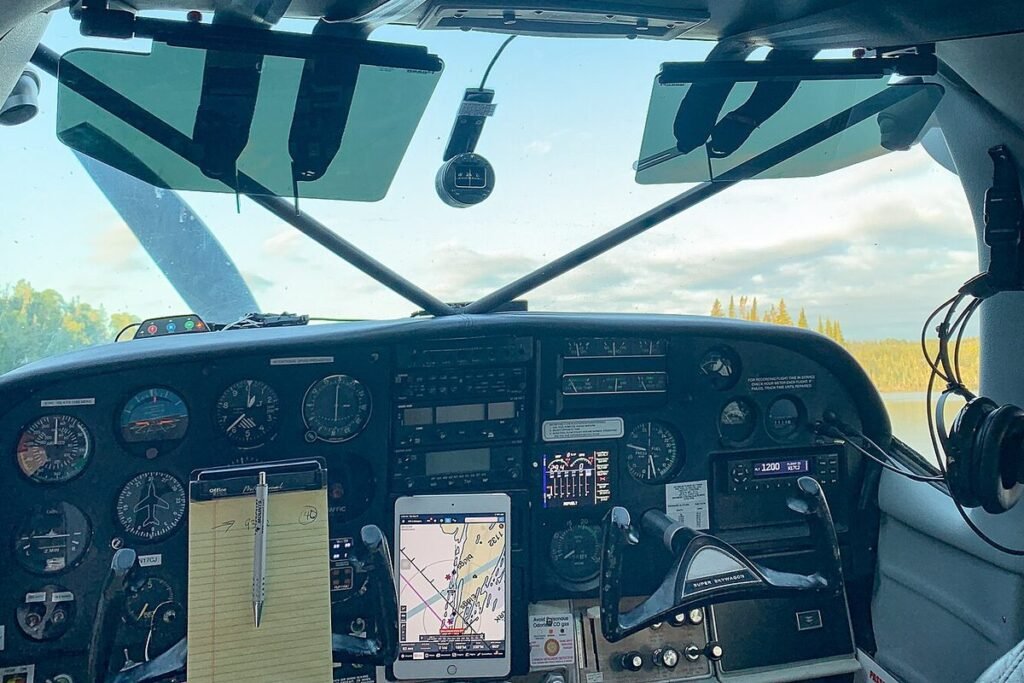
I run ForeFlight on an iPad mini in a kneeboard mount. For a Cessna 172 cockpit, that size is the sweet spot.
Garmin Pilot: Android support and avionics integration
Garmin Pilot’s first advantage is the platform: it runs on Android tablets and phones as well as on iPad and iPhone, and one subscription covers up to three devices. For a pilot who already owns a Samsung tablet, it is the only top-tier option.
The second advantage is the panel. With a Garmin Flight Stream gateway or a Connext-capable unit, Garmin Pilot sends flight plans to a GTN navigator, streams engine data from equipped avionics, and with Database Concierge loads navigation databases into the panel wirelessly. ForeFlight can also send flight plans to a GTN through Flight Stream 510, but database loading is a Garmin-only trick.
The interface feels busier than ForeFlight’s at first, with more menus and a home screen built like a dashboard. Pilots who come from Garmin glass cockpits often find it more familiar, because the symbols, SafeTaxi diagrams and FliteCharts match the panel.
Flight planning and filing compared
Both apps file VFR and IFR flight plans, show expected routes, calculate fuel and time, and build a weather briefing for your route. Differences show up in the details:
- Route building: ForeFlight’s rubber-band editing on the map is quicker. Garmin Pilot’s route entry is more structured, closer to programming a GTN.
- Briefings: ForeFlight’s graphical briefing is clean and easy to scan, organized by phase of flight. Garmin Pilot’s briefing is thorough but denser.
- Web planning: both have a browser version for planning at a desk, ForeFlight Web and Garmin Pilot Web, which sync routes and aircraft profiles to the tablet.
- Weight and balance: both include it at the entry level; ForeFlight’s graphical envelope is easier to read.
Synthetic vision, terrain and in-flight awareness
Synthetic vision draws a 3D view of terrain, obstacles and runways from a GPS and attitude source, like a glass panel in your tablet. ForeFlight includes it from Essential; Garmin from Premium as SVX. Both need an external AHRS source for a stable attitude, usually an ADS-B receiver such as ForeFlight’s Sentry line or a Garmin GDL portable.
That receiver matters more than the subscription. Without one, you get no in-flight ADS-B weather or traffic, and on a typical rental airplane the tablet’s internal GPS is all you have. Budget for it when you compare total cost.
Tablet size and heat
Both apps run on phones, but a tablet is the real cockpit tool. An iPad mini or an 8-inch Android tablet fits a kneeboard and leaves the yoke clear; a full-size tablet is easier to read in a suction-cup or yoke mount. Whatever you pick, summer sun through a Cessna windshield can overheat a tablet in minutes, and both apps lose their screen when the device shuts down to cool itself. Keep it out of direct sun, carry a phone with the same app logged in as a backup, and plan for a battery pack on long legs.
Switching apps without losing your data
Pilots do switch, usually when they buy a Garmin-equipped airplane or change tablets. A few things travel easily and a few do not:
- Logbook: ForeFlight exports its logbook to CSV, and most dedicated logbook apps can import that file. Move it once, check the totals against your paper records, and archive the original export somewhere safe.
- Aircraft profiles: you rebuild them by hand, including weight and balance stations and performance figures.
- Checklists and documents: both import PDFs; custom checklists usually need retyping.
- Muscle memory: the real cost. Give yourself a few local flights before using the new app on an IFR trip.
Logbook, checklists and extras
Both apps include a digital pilot logbook that can create draft entries from recorded tracks and sync to the cloud. ForeFlight’s logbook adds instructor endorsements and remote signatures, which matters for students and CFIs. Garmin’s builds entries from GPS data and syncs to flyGarmin.com.
Track logs are another strong point on both sides: replay a flight in 3D afterwards with altitude and speed. I use that after every cross-country to see where I wasted time on climbs and detours.
Which EFB app to pick
Neither app is a bad choice. The right one depends on the tablet you already own, the avionics in the airplanes you fly most often, and whether your instructor or flying club has standardized on one of them.
- Student pilot or VFR renter on iPad: ForeFlight Starter. Most schools teach with it, and instructors know it.
- Android user: Garmin Pilot, no contest.
- Garmin panel owner: Garmin Pilot Premium for Connext and Database Concierge.
- IFR pilot on iPad: ForeFlight Essential, unless the $50 annual gap matters to you more than the interface.
- Faster or turbine aircraft: ForeFlight Premium for performance planning.
FAQ
Is ForeFlight available on Android?
No. ForeFlight runs on iPad and iPhone, with ForeFlight Web for planning in a browser. Android pilots usually choose Garmin Pilot, which runs on both platforms.
Is Garmin Pilot cheaper than ForeFlight?
Yes. Garmin Pilot Standard costs $109.99 a year against $130 for ForeFlight Starter, and Garmin Pilot Premium costs $209.99 against $260 for ForeFlight Essential, the closest match in features.
Can you use ForeFlight or Garmin Pilot as your only navigation source?
An EFB is legal to carry charts and is widely used for situational awareness, but the airplane's certified avionics stay the primary navigation source for IFR. For VFR flying, many pilots navigate with the tablet and keep a backup device or paper chart.
Do I need an ADS-B receiver with an EFB app?
Not on the ground, but in flight it is the only way to receive free ADS-B weather and traffic in the US. A portable receiver also provides the attitude data that synthetic vision needs.
Keep exploring
- Pilot Apps & WeatherBest Digital Pilot Logbook Apps
- Pilot Apps & WeatherHow to Read a METAR and TAF (With Decoded Examples)
- Pilot Apps & WeatherBest Aviation Weather Websites for Pilots
- Air TravelBest Websites for Finding Cheap Flights
- Aviation CareersAirline Pilot Salary in 2026: Regional to Major
- Aviation News & MediaBest Aviation News Websites to Follow
- Flight SimulatorsFree Flight Simulators You Can Fly Today