
Flight Sim Setup: Yokes, Pedals, Throttles and Headsets
.jpg)
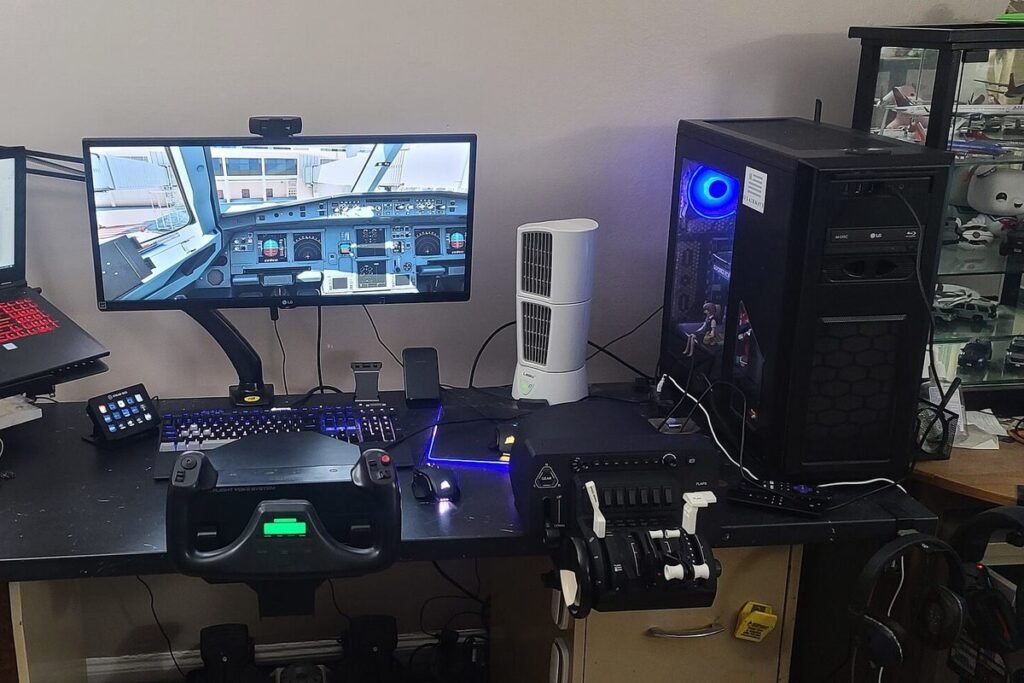
A good flight sim setup starts with one controller that fits the aircraft you fly most, adds rudder pedals second, and treats head tracking or VR as the upgrade that changes everything else. Around $150 gets you flying properly, about $500 builds a convincing general aviation cockpit, and $1,500 or more buys hardware that feels close to the real airplane.
Yoke or joystick: match it to the airplane
The controller should look like what the pilot of your favorite aircraft holds:
- Yoke: Cessnas, Pipers, Beechcraft, King Airs and Boeing airliners. Push and pull for pitch, turn for roll, with long travel that lets you make small corrections on final.
- Joystick or HOTAS: fighters, aerobatic airplanes, warbirds and most helicopters. HOTAS, “hands on throttle and stick,” puts buttons for every function under your fingers.
- Sidestick: Airbus airliners. A dedicated Airbus-style stick sits to the side, with a separate throttle quadrant carrying the A320’s detents.
If you fly a bit of everything, a joystick is the more flexible first buy: it works in a Cessna, an F-16 and a helicopter. A yoke is the better choice once you know you mostly fly general aviation in Microsoft Flight Simulator or X-Plane, or if you are training for a real certificate and want your hands to learn the right movements.
Tier 1, about $150: one good controller
At this budget, spend on a single device rather than three cheap ones:
- Thrustmaster T.Flight Hotas One, Microsoft Flight Simulator edition, $109.99. Stick and detachable throttle, a twist grip for rudder and enough buttons for flaps, gear and trim.
- Logitech G Flight Yoke System, $179.99 list, often $159.99 on sale. Yoke plus a three-lever throttle quadrant, the classic entry point for GA flying.
- Thrustmaster TCA Sidestick Airbus Edition, $89.99. For Airbus fans, with room left in the budget for a throttle later.
Twist-grip rudder on a stick is a compromise, but it is fine for learning. Map trim to a thumb button before anything else; holding pressure on the controls is the number one reason new simmers find landings hard.
Tier 2, about $500: yoke, pedals and head tracking
This is the setup that makes a home simulator feel like a cockpit. A typical build:
| Part | Example | Price |
|---|---|---|
| Yoke and throttle quadrant | Logitech G Flight Yoke System | $179.99 |
| Rudder pedals with toe brakes | Thrustmaster T.Flight Rudder Pedals | $129.99 |
| Head tracking | TrackIR 5 with TrackClip | $159.95 |
| Total | about $470 |
Swap the Thrustmaster pedals for Logitech G Flight Rudder Pedals at $179.99 and you land near $520. Either set gives you rudder plus differential toe brakes, which is what you need for crosswind landings, steering on the ground and coordinated turns.
Why pedals come before anything fancy
In a real Cessna, your feet do constant work: right rudder in the climb to counter P-factor, rudder into the turn to keep the ball centered, and fine footwork on the runway in a crosswind. Without pedals, the sim either does it for you with auto-rudder or you fight a twist grip. Pedals are the single biggest step in realism for anyone heading toward real flying.
Head tracking for a free look around
TrackIR uses an infrared camera on your monitor and a clip on a cap. A small turn of the head becomes a large turn of the view, so you can look over your shoulder at the runway on downwind while your eyes stay on the screen. Free alternatives exist: open-source opentrack works with a webcam, and Tobii eye trackers offer another approach. TrackIR remains the most precise and the most widely supported by the major sims.
Tier 3, $1,500 and up: Honeycomb and VR
Honeycomb Aeronautical makes the hardware that serious GA and airliner simmers covet:
- Alpha Flight Controls, $299.99: a metal-shafted yoke with a magneto key switch, master and avionics switches, and a feel much closer to a real control column.
- Bravo Throttle Quadrant, $299.99: interchangeable levers for single-engine, twin and jet setups, a gear lever, flap switch, autopilot panel and annunciator lights.
- Charlie Rudder Pedals, $349.99: long travel, toe brakes and a much stronger frame than entry-level pedals.
Those three come to about $950. Add a Meta Quest 3 at $599.99 for VR and you reach roughly $1,550. Beyond that, the market keeps going: force-feedback yokes, dedicated cockpit frames, physical radio panels and replica instrument panels that cost as much as a used car.
Throttle quadrants: levers that match the airplane
A separate quadrant matters as soon as you fly anything with more than one lever. A piston single needs throttle, propeller and mixture; a twin needs two of each; an airliner needs two thrust levers, speed brakes and flaps. The Logitech yoke includes a three-lever quadrant, the Honeycomb Bravo adds a full autopilot panel, and the Thrustmaster TCA Quadrant Airbus Edition, $129.99, reproduces the A320’s detents for climb and FLEX thrust.
Mount quadrants where your hand falls naturally: to the right of the yoke for a Cessna or Boeing, to the left of the sidestick for an Airbus captain’s seat.
Monitors vs VR
- Single monitor: cheapest, sharpest text, easy to see the instruments. Pair it with head tracking to look around.
- Ultrawide or triple monitors: peripheral vision in the pattern and great for formation or VFR flying. Needs a strong GPU and desk space.
- VR headset: unmatched sense of scale and depth, perfect for judging height in the flare. Harder to read small gauges, harder to use a physical keyboard, and heavy on the GPU. A Quest 3S starts at $349.99 after Meta’s April 2026 increase.
I fly on a monitor with TrackIR for instrument practice and switch to VR for VFR sightseeing. Reading an approach chart and the panel together is still easier on a flat screen.
Binding controls the way a cockpit works
Hardware only feels real once the buttons do what the airplane’s switches do. A layout that works for most GA flying:
- Elevator trim on a rocker or two buttons under your left thumb, never on the keyboard.
- Flaps up and down on the throttle quadrant or a nearby button pair.
- Push-to-talk and view reset on the yoke horns.
- Parking brake, landing gear and autopilot disconnect on separate, easy-to-find buttons.
Save a separate profile for each aircraft family. Both Microsoft Flight Simulator and X-Plane let you store control profiles, so a jet can use reverse thrust on the throttle detent while a Cessna keeps mixture there. Ten minutes of setup per profile saves hours of fumbling on approach.
Headsets, VATSIM and the radio side
For offline flying, any gaming headset or speakers will do. For online ATC networks such as VATSIM, which is free and staffed by volunteer controllers, a headset with a decent microphone and a push-to-talk button mapped on your yoke make radio calls natural. Real aviation headsets work too but need adapters, and their main advantage, noise reduction, is wasted at a desk.
Push-to-talk placement matters more than headset brand. Put it on the left horn of the yoke or a thumb button on the stick, exactly where a real pilot keys the mic.
I would spend in this order on a limited budget: one controller, pedals, head tracking, then VR. The same hardware works with every major flight simulator, so nothing is wasted if you later switch sims, and you can test it first in free flight simulators before committing to a paid one.
Related reading: How to Become a Flight Attendant: Requirements and Pay · Is Flying Safe? Turbulence
FAQ
Do you need rudder pedals for flight simulator?
Not to start, since most sims offer auto-rudder or a twist-grip stick. Pedals become important for crosswind landings, ground steering, helicopters and anyone using the sim to prepare for real flying. Entry-level sets with toe brakes start around $130.
Is a yoke or joystick better for flight sim?
A yoke suits general aviation airplanes and Boeing airliners, while a joystick suits fighters, aerobatics, helicopters and Airbus with a sidestick. A joystick is the more flexible first purchase if you fly many aircraft types.
How much does a good flight sim setup cost?
About $150 buys a solid stick or yoke, around $500 adds rudder pedals and head tracking, and $1,500 or more covers premium Honeycomb hardware plus a VR headset. A capable PC is a separate cost.
Is VR worth it for flight simulation?
For VFR flying and judging height on landing, VR is a huge improvement in immersion. It demands a strong graphics card and makes small instruments harder to read, so many simmers keep a monitor for instrument work.
Keep exploring
- Flight SimulatorsCan a Flight Simulator Help You Learn to Fly?
- Flight SimulatorsBest Flight Simulators for PC in 2026
- Flight SimulatorsFree Flight Simulators You Can Fly Today
- Air TravelIs Flying Safe? Turbulence
- Aviation CareersHow to Become a Flight Attendant: Requirements and Pay
- Aviation News & MediaAviation Forums and Online Communities
- Flight TrackingHow Flight Tracking Works: ADS-B